Start with the work you want to book
A portfolio can look impressive and still leave a potential client unsure what you do. Before choosing a layout, write one sentence: “We make this kind of work for this kind of client.” Your opening screen, selected projects and inquiry route should support that sentence.
Below are three websites we designed. They explore different directions, rather than proving that one style brings more bookings. Use them to decide what fits your images, films and audience.
01 / LUMEN: let the photographs lead
LUMEN combines an editorial layout, generous images and a quieter pace. It suits a portfolio where expressions, light and individual photographs carry the story. Categories make different types of work easy to find; a project page gives a visitor room to look beyond one hero image.
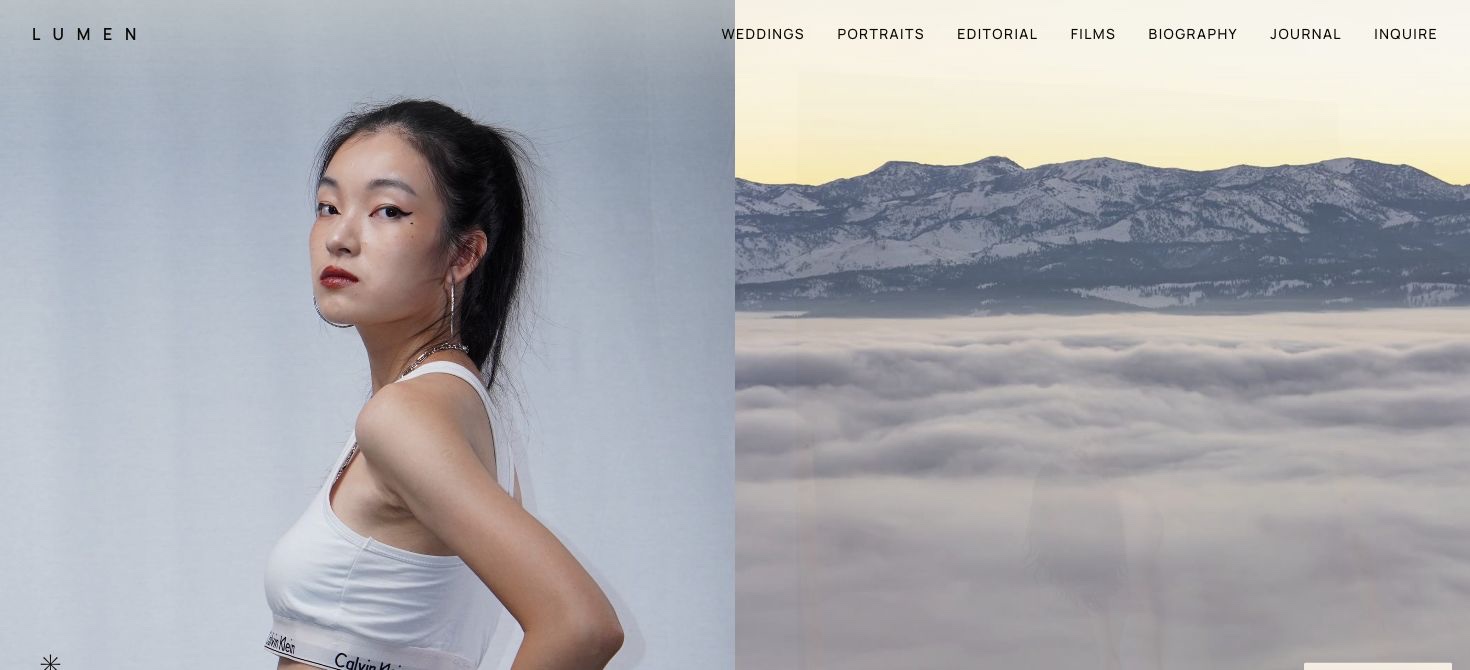
Choose this direction if you want people to study the photographs. Prepare several complete, carefully edited selections. A beautiful opening image cannot compensate for a gallery filled with near-duplicates or work you no longer want to sell.
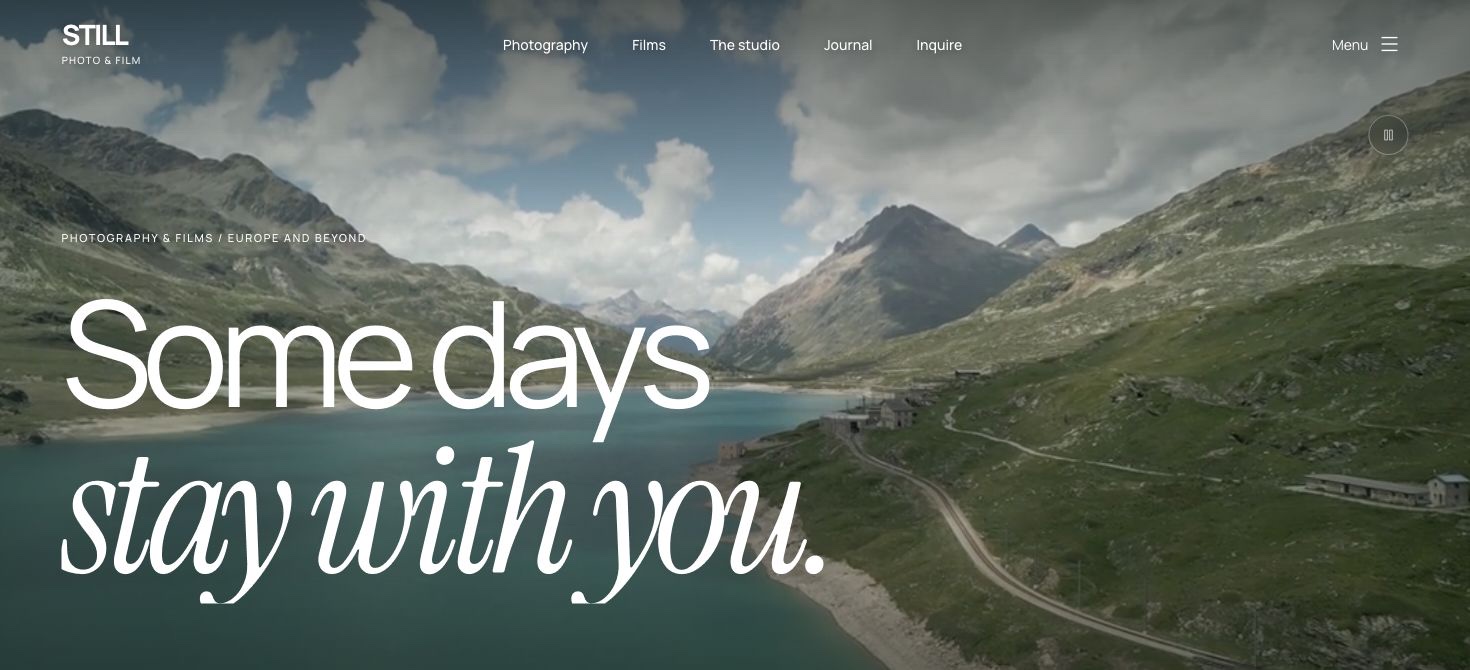
02 / STILL: make the first impression cinematic
STILL gives film a stronger role, while keeping photography part of the same portfolio. A moving first screen can introduce rhythm and atmosphere before a visitor opens a project. The full films still need an obvious play action and a comfortable viewing experience.
Do not make essential information depend on autoplay. Browser playback policies vary, so a readable title and a useful poster image must work when the video does not start. A silent background loop and a film someone deliberately chooses to watch serve different purposes.
Explore the STILL website. When evaluating it for your own work, test the journey from the opening screen to a specific film, then back to photography. Neither medium should feel like an afterthought.
03 / OUTLOUD: build around energy and contrast
OUTLOUD uses a bolder visual language for sport, fashion and commercial production. Photography and video share a close-packed grid. The project, not its media type, becomes the reason to click.
This approach needs a clear hierarchy. A visitor should understand which tiles open films, which open photographs and how to close the viewer. Motion can make the page feel alive, but it should not force someone through a long animation every time they want to return to a project.
Explore OUTLOUD. It is a better starting point for an energetic production identity than for a deliberately quiet, intimate presentation.
A short checklist before you commission a website
- Opening: can someone tell what you shoot and who it is for without scrolling?
- Work: can they reach one complete project quickly, rather than only watch a showreel?
- Phone: are faces, captions and playback controls still usable on a narrow screen?
- Motion: can they browse comfortably with animation reduced or video paused?
- Inquiry: is the next step visible, and does the inquiry reach the right place?
- Ownership: who can update galleries, text and articles after handover?
Give the designer the same real material for every direction you compare. A layout that works with an ideal stock image may behave differently with the photographs and films you actually plan to publish.
Decide what happens after launch
The public site is only part of the brief. List what you expect to update yourself: hero photographs, portfolio projects, journal posts, prices or contact information. Then agree on the editing tools, hosting, domain ownership and ongoing support.
A website contact form can also lead into an existing CRM. Embedding a published inquiry form is a different scope from developing a two-way integration. Define what should happen after submission before calling either option “connected.” Our CRM guide gives you a practical way to separate those needs.
Frequently asked questions
Can I open these websites?
Yes. LUMEN, STILL and OUTLOUD each have a working version you can open from its case page and test on a phone or desktop.
Should a videographer website start with autoplay video?
It can, but the opening should remain useful when playback does not start. Provide a poster and a clear way to view the work. Browser autoplay behaviour is part of the testing.
Can a photography and film studio use one portfolio?
Yes. Organise the work so a visitor can recognise photo and film projects and open each in an appropriate viewer.